# matplotlib

## Simple Examples

### errorbar

```python
#!/usr/bin/python3

"""
	VER = 23.1026
	--
	DESCR:
	Побудова matplotlib.pyplot errorbar (лінія з похибками) в PDF (через borb)

"""

import sys
import _lib_
import _conf

from borb.pdf import Document
from borb.pdf import Page
from borb.pdf import SingleColumnLayout
from borb.pdf import PageLayout
from borb.pdf import Paragraph
from borb.pdf import PDF
from borb.pdf import Chart

from decimal import Decimal
import matplotlib.pyplot as plt
import numpy as np                        # for np.arange


SCRIPT_NAME = 'test_plot_errorbar'

def create_plot() -> None:

	fig, ax = plt.subplots()
	x = [1, 2, 5, 8, 12, 16]
	y_et = [1, 2, 5, 8, 12, 16]

	y = [0.82, 1.5, 4.32, 7.12, 10.86, 14.81]
	yerr = [0.44, 0.52, 0.94, 0.93, 1.13, 1.44]

	ax.set_title('Залежність кількості поділок шкали від швидкості потоку')
	ax.set_ylabel('Кількість поділок шкали за секунду')
	ax.set_xlabel('Середня швидкість повітряного потоку, м/с')
	ax.grid(True)

	# ручна розмітка поділок на осях, якщо необхідна своя
	yticks = np.arange(0, 17, 1)
	xticks = np.arange(1, 17, 1)
	ax.set_xticks(xticks)
	ax.set_yticks(yticks)

	plt.plot(x, y_et, color='orange', dashes=[6, 2], label='Ідеальний прилад')
	plt.errorbar(x, y, yerr=yerr, label='Анемометр 11486')
	
	plt.legend(loc='lower right')
	# https://matplotlib.org/stable/api/_as_gen/matplotlib.pyplot.legend.html#matplotlib.pyplot.legend

	return plt.gcf()


def main():
	# create Document
	doc: Document = Document()

	# create Page
	page: Page = Page()

	# add Page to Document
	doc.add_page(page)

	# set a PageLayout
	layout: PageLayout = SingleColumnLayout(page)

	# add a Paragraph
	layout.add(Chart(create_plot(), width=Decimal(350), height=Decimal(256)))

	# store
	with open('output_' + SCRIPT_NAME + '.pdf', "wb") as pdf_file_handle:
		PDF.dumps(pdf_file_handle, doc)


if __name__ == "__main__":
	main()


```

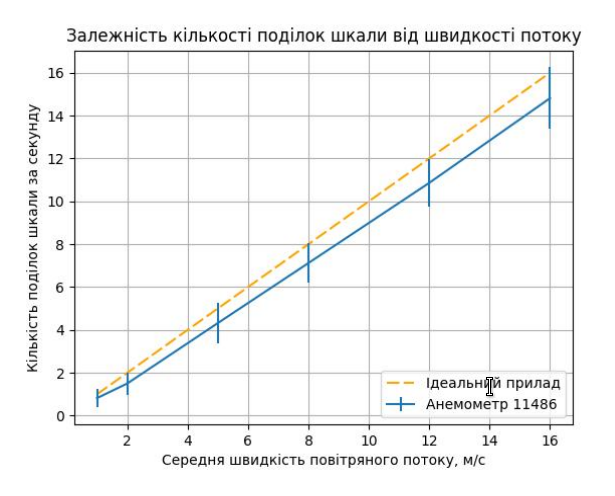
<figure><img src="/files/T5bcGONc3Zi4aZcOiXXe" alt=""><figcaption><p>Автоматична розмітка поділок</p></figcaption></figure>

<figure><img src="/files/apDLYZx6w22xVyIVFVtX" alt=""><figcaption><p>З блоком коду "ручна розмітка поділок на осях..."</p></figcaption></figure>

### fill\_between

```python
#!/usr/bin/python3

"""
	VER = 23.1026
	--
	DESCR:
	Побудова matplotlib.pyplot fill_between (область похибок)

"""

import sys
import _lib_
import _conf

from borb.pdf import Document
from borb.pdf import Page
from borb.pdf import SingleColumnLayout
from borb.pdf import PageLayout
from borb.pdf import Paragraph
from borb.pdf import PDF
from borb.pdf import Chart

from decimal import Decimal
import matplotlib.pyplot as plt


SCRIPT_NAME = 'test_plot_errorbar'

def create_plot() -> None:

	fig, ax = plt.subplots()
	x = [1, 2, 5, 8, 12, 16]
	y_et = [1, 2, 5, 8, 12, 16]

	y = [0.56, 1.57, 4.42, 7.20, 11.04, 15.06]
	yerr = [0.44, 0.52, 0.94, 0.93, 1.13, 1.44]

	ax.set_title('Залежність кількості поділок шкали від швидкості потоку')
	ax.set_ylabel('Кількість поділок шкали за секунду')
	ax.set_xlabel('Середня швидкість повітряного потоку, м/с')
	ax.grid(True)

	plt.plot(x, y_et, color='red', dashes=[6, 2], label='Ідеальний прилад')

	# область невизначеності
	y_min = []
	y_max = []

	for i in range(len(y)):
		y_min.append(y[i]-yerr[i])
		y_max.append(y[i]+yerr[i])

	plt.plot(x, y, label='Анемометр 11486')
	ax.fill_between(x, y_min, y_max, alpha=0.2)

	plt.legend(loc='lower right')
	# https://matplotlib.org/stable/api/_as_gen/matplotlib.pyplot.legend.html#matplotlib.pyplot.legend

	return plt.gcf()


def main():
	# create Document
	doc: Document = Document()

	# create Page
	page: Page = Page()

	# add Page to Document
	doc.add_page(page)

	# set a PageLayout
	layout: PageLayout = SingleColumnLayout(page)

	# add a Paragraph
	layout.add(Chart(create_plot(), width=Decimal(350), height=Decimal(256)))

	# store
	with open('output_' + SCRIPT_NAME + '.pdf', "wb") as pdf_file_handle:
		PDF.dumps(pdf_file_handle, doc)


if __name__ == "__main__":
	main()

```

<figure><img src="/files/YvXa24a04BgF1pfr3tTX" alt=""><figcaption></figcaption></figure>

### savefig

```python
#!/usr/bin/python3

"""
	VER = 23.1026
	--
	DESCR:
		Побудова matplotlib.pyplot і збереження у файл png

"""

import sys
import _lib_
import _conf

from borb.pdf import Document
from borb.pdf import Page
from borb.pdf import SingleColumnLayout
from borb.pdf import PageLayout
from borb.pdf import Paragraph
from borb.pdf import PDF
from borb.pdf import Chart

from decimal import Decimal
import matplotlib.pyplot as plt

def create_plot_png(filename, serial, aver_str, indet_str) -> None:

	fig, ax = plt.subplots()
	x = [1, 2, 5, 8, 12, 16]
	y_et = [1, 2, 5, 8, 12, 16]

	y    = aver_str.split(';')
	yerr = indet_str.split(';')

	y    = list((float(i) for i in y))
	yerr = list((float(i) for i in yerr))

	ax.set_title('Залежність кількості поділок шкали від швидкості потоку')
	ax.set_ylabel('Кількість поділок шкали за секунду')
	ax.set_xlabel('Середня швидкість повітряного потоку, м/с')
	ax.grid(True)

	plt.plot(x, y_et, color='orange', dashes=[6,2], label='Еталон') #Ідеальний прилад
	plt.errorbar(x, y, yerr=yerr, label=f'Анемометр {serial}')
	plt.legend(loc='lower right')

	plt.savefig(filename + '_' + serial)

	return None


def main():
	create_plot_png('/home/olex/www/meteo/meteo.pp.ua/test/image',
			'3333',
			'0.56;1.5667;4.4183;7.2033;11.0417;15.065',
			'0.4295;0.5195;0.9461;0.9347;1.1373;1.4506')
	print('ready!')


if __name__ == "__main__":
	main()

```

<figure><img src="/files/h2L6D5pPyJd8Dtu720dB" alt=""><figcaption><p>Це PNG-файл, створений скриптом</p></figcaption></figure>

### Дивись також:

[https://matplotlib.org/stable/gallery/index.html](https://matplotlib.org/stable/gallery/index.html#)\
<https://matplotlib.org/stable/users/explain/axes/legend_guide.html>\
<https://matplotlib.org/stable/api/_as_gen/matplotlib.pyplot.legend.html>\
\
<https://mipt-stats.gitlab.io/courses/python/06_matplotlib.html>


---

# Agent Instructions: Querying This Documentation

If you need additional information that is not directly available in this page, you can query the documentation dynamically by asking a question.

Perform an HTTP GET request on the current page URL with the `ask` query parameter:

```
GET https://olexsyn.gitbook.io/enote/progr/python/modules/matplotlib.md?ask=<question>
```

The question should be specific, self-contained, and written in natural language.
The response will contain a direct answer to the question and relevant excerpts and sources from the documentation.

Use this mechanism when the answer is not explicitly present in the current page, you need clarification or additional context, or you want to retrieve related documentation sections.